Monday, August 22, 2022

Http Status Codes

Http Status Codes
  • 200 OK
  • 201 Created
  • 204 No Content
  • 304 Not Modified
  • 400 Bad Request
  • 401 Unauthorized
  • 403 Forbidden
  • 404 Not Found
  • 409 Conflict
  • 500 Internal Server Error
  • 501 Not Implemented
  • 502 Bad Gateway
  • 503 Service Unavailable.

Sunday, September 16, 2018

Sorting Algorithms

  1. Merge Sort: It is divider and conquer technique.
    1. Divide the array into two halves using MergeSort() function.
    2. Merge the two sub arrays into single in sorted order using Merge() function.
    3. Merge sort program in c#
    4. Time complexity O(n logn).
  2. Insertion Sort:
    1. Its like Playing cards., take an element, Find location / index to insert this new element, by Comparing with all existing elements.
    2. InsertionSort in C#
    3. Time complexity O(n * n).
  3. Selection Sort:
    1. Sorts an array by repeatedly finding the minimum element from unsorted part of array.
    2. Selection sort in c#
    3. Time complexity O(n * n).

Thursday, September 6, 2018

LINQ Single vs SingleOrDefault vs First vs FirstOrDefault

 Single()SingleOrDefault()First()FirstOrDefault()
DescriptionReturns a single, specific element of a sequenceReturns a single, specific element of a sequence, or a default value if that element is not foundReturns the first element of a sequenceReturns the first element of a sequence, or a default value if no element is found
Exception thrown whenThere are 0 or more than 1 elements in the resultThere is more than one element in the resultThere are no elements in the resultOnly if the source is null (they all do this)
When to useIf exactly 1 element is expected; not 0 or more than 1When 0 or 1 elements are expectedWhen more than 1 element is expected and you want only the firstWhen more than 1 element is expected and you want only the first. Also it is ok for the result to be empty

Monday, July 2, 2018

Monday, June 18, 2018

int.parse vs Convert.int32

Both int.Parse and Convert.ToInt32 are used to convert string into the integer but Only difference between them is to Convert.ToInt32 handle null and returns '0' as output and int.parse is not going to handle NULL and will give a Argument Null Exception.

Similarly, Convert.ToString()  handles Null value and return string.empty (""), where as
.ToString() will throw exception in case of Nulls.

Wednesday, June 13, 2018

String vs StringBuilder C#

String
Namespace: System
 String is an immutable type. That is, each operation that appears to modify a String object actually creates a new string.
Consider using the String class under these conditions:
  1. When the number of changes that your code will make to a string is small.
  2. When you are performing a fixed number of concatenation operations, particularly with string literals. In this case, the compiler might combine the concatenation operations into a single operation.
  3. When you have to perform extensive search operations while you are building your string. The StringBuilder class lacks search methods such as IndexOf or StartsWith. You'll have to convert the StringBuilder object to a String for these operations, and this can negate the performance benefit from using StringBuilder.
String Example
 string stringObj = "Hello Sam";
 // create a new string instance instead of changing the old one
 stringObj += " How Are";
 stringObj += " You ??";
Console.WriteLine(stringObj );
Stringbuilder
Represents a mutable string of characters. This class cannot be inherited. 
    Namespace: System.Text

StringBuilder is mutable, means when you create string builder object you can perform any operations like insert, replace or append without creating new instance for every time. It will update string at one place in memory doesn't create new space in memory.

Consider using the StringBuilder class under these conditions:

  • When you expect your code to make an unknown number of changes to a string at design time (for example, when you are using a loop to concatenate a random number of strings that contain user input).

  • When you expect your code to make a significant number of changes to a string.

StringBuilder  Example
 

 StringBuilder stringBuilderObj = new StringBuilder("");
 stringBuilderObj .Append("Hello Sam");
 stringBuilderObj .Append("How Are You ??");

Console.WriteLine(stringBuilderObj.ToString());

Thursday, June 7, 2018

Math.Round Method (Double)

Rounds a double-precision floating-point value to the nearest even integral value.
examples: 
Console.WriteLine(Math.Round(6.5)); => 6
Console.WriteLine(Math.Round(11.5)); => 12

C# 6.0

Features in C# 6.0 


  • Improved Syntax IntelliSense.
  • New lightbulb to suggest changes.
  • Preview Window  before commit changes.
  • Easier rename / refactoring.
  • nameof expressions
  • String interpolation.
  • Checking null-conditional operators.

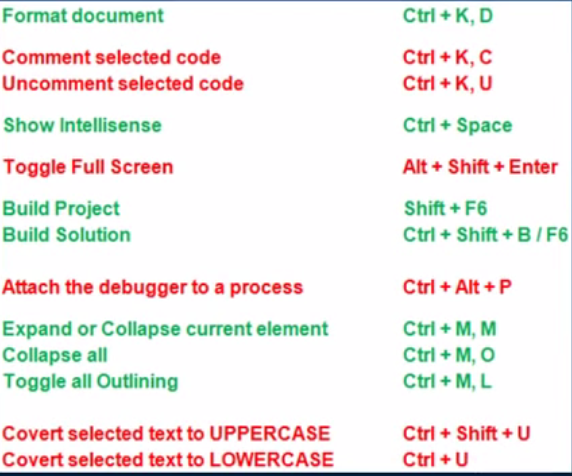
Visual Studio Keyboard shortcuts


Saturday, June 2, 2018

[SQL Server] Create constraints using ALTER TABLE

Create Default Constraint:
ALTER TABLE <TableName>
ADD CONSTRAINT [<constraint_name>] DEFAULT (<default_Value>) FOR <Column_name>

Create a PRIMARY KEY Constraint:
ALTER TABLE <Table_name>
ADD CONSTRAINT [PK_Constraint_name] PRIMARY KEY (PK_Column_name) 

Thursday, May 31, 2018

ASP.NET Life-Cycle Events

  1. PreInit,
  2. Init,
  3. InitComplete,
  4. PreLoad,
  5. Load,
  6. LoadComplete, 
  7. PreRender,
  8. PreRenderComplete
  9. SaveStateComplete
  10. Render
  11. Unload.


ASP.NET Page Life Cycle stages

General Page Life-Cycle Stages
Stage
Description
Page request
The page request occurs before the page life cycle begins. When the page is requested by a user, ASP.NET determines whether the page needs to be parsed and compiled (therefore beginning the life of a page), or whether a cached version of the page can be sent in response without running the page.
Start
In the start stage, page properties such as Request and Response are set. At this stage, the page also determines whether the request is a postback or a new request and sets the IsPostBack property. The page also sets the UICulture property.
Initialization
During page initialization, controls on the page are available and each control's UniqueID property is set. A master page and themes are also applied to the page if applicable. If the current request is a postback, the postback data has not yet been loaded and control property values have not been restored to the values from view state.
Load
During load, if the current request is a postback, control properties are loaded with information recovered from view state and control state.
Postback event handling
If the request is a postback, control event handlers are called. After that, the Validate method of all validator controls is called, which sets the IsValid property of individual validator controls and of the page. (There is an exception to this sequence: the handler for the event that caused validation is called after validation.)
Rendering
Before rendering, view state is saved for the page and all controls. During the rendering stage, the page calls the Render method for each control, providing a text writer that writes its output to the OutputStream object of the page's Response property.
Unload
The Unload event is raised after the page has been fully rendered, sent to the client, and is ready to be discarded. At this point, page properties such as Response and Request are unloaded and cleanup is performed.

Four Pillars of OOP ?

  • Abstraction
  • Polymorphism
  • Inheritance
  • Encapsulation are four pillars of Object Oriented Programming.

What's inheritance ?

When an object or class is based on a parent object or class taking on its characteristics.

Multiple Inheritance possible in C# ?
No. though we can implement class with multiple interfaces.

What’s encapsulation & abstraction?

Encapsulation: Prevents access to implementation details.
example: private methods / member variables inside an interface.

Abstraction: allows making relevant information visible. Abstraction can be done by using Abstract keyword to the classes.
example: public methods or data with in interfaces / abstract classes.

What’s POLYMORPHISM?

It’s when classes have different functionality while sharing the same interface.
REMEMBER TO NOTE!!!: Interfaces or abstract classes can be used